MCP Gateway
The MCP Gateway is a reverse-proxy passthrough that sits between MCP clients and MCP servers. It authenticates users, ensures servers are deployed, and forwards requests without modifying the MCP protocol.
Gateway Architecture
The gateway is intentionally simple. It handles three things:
- Authentication: Validates users against the configured identity provider
- Server Deployment: Ensures the target MCP server is running (via Docker or Kubernetes)
- Proxy: Forwards requests to the MCP server and returns responses

All other functionality (authorization, audit logging, webhook filters, token exchange) is handled by the MCP Server Shim that runs alongside each MCP server.
The MCP Server Shim
Every MCP server runs with a shim. This includes servers deployed by Obot and remote MCP servers. The shim is protocol-aware and handles:
- Authorization: Checking access control rules
- Audit Logging: Recording request/response metadata
- Webhook Filters: Invoking configured filters on requests and responses
- Token Exchange: Exchanging tokens for OAuth-protected servers
Secrets (client credentials, token exchange secrets, audit tokens) live in the shim and are never exposed to the MCP server itself. Similarly, MCP server configuration is never exposed to the shim.
Deployment
- Kubernetes: All containers (MCP server, shim, webhook converters) run in a single pod and communicate over localhost
- Docker: Containers communicate via
host.docker.internalor local IP
Token Exchange
For OAuth-protected MCP servers, the gateway forwards the original bearer token unchanged. The shim then performs a token exchange using the OAuth 2.0 Token Exchange standard (RFC 8693).
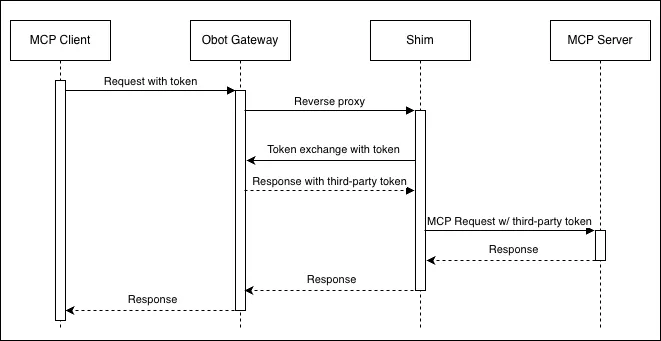
This approach provides:
- Standards compliance: Token exchange is a well-defined OAuth extension
- Flexibility: Additional credentials can be passed to MCP servers without changing the gateway
Webhook Filters
Webhook filters allow inspection and modification of MCP traffic. Existing HTTP webhooks are automatically converted to MCP servers that run alongside the shim.
In the future, users will be able to build webhook filters directly as MCP servers.
Connecting to the Gateway
With Obot Chat
Obot Chat connects through the gateway automatically. Users select which MCP servers to enable for their projects.
With External Clients
External MCP clients (Claude Desktop, Cursor, VS Code) can connect using the gateway endpoint:
https://your-obot-instance/mcp-connect/{server-id}
All servers are exposed via streamable-http transport, regardless of their underlying runtime.